


Chroma is a polished coloring app built for adults who want a more tool-focused digital coloring experience. It offers realistic brushes and a more detailed way to color, with options like stroke-by-stroke coloring and tap-to-fill for faster sessions. The app also includes a large library of pages, plus extra features like time-lapse replays and buddy coloring.
| What Works Well | Things to Keep in Mind |
|---|---|
| Realistic coloring tools with adjustable brush settings | No free version or trial—you have to pay upfront |
| Tap-to-fill option for quicker coloring | Only available on iOS (not on Android) |
| Fun extras like time-lapse replays and buddy coloring | Some illustrations may be AI-assisted, not fully hand-drawn |
| Smooth Apple Pencil support on iPad | More of a premium app experience, which may feel unnecessary for casual users |
Chroma is a solid premium option if you want realistic digital coloring tools and extra features like time-lapse replays and buddy coloring. However, the lack of a free version, the iOS-only limitation, and the paid-upfront model make it less accessible to many users.
If you’re looking for something easier to jump into (especially without spending money right away), it’s worth considering an alternative.

Now, Why ColoringHub Really Stands Out?
If you love coloring (even just casually), ColoringHub is one of those websites that makes you go, “Wait… this is free?” Because it really is.
It’s not trying to be a fancy premium app, and that’s actually part of the charm. It’s simple, fast, and packed with content. And once you start browsing, it’s hard not to get pulled in.
Here are the biggest advantages that set ColoringHub apart:
1. It’s 100% Free — and Actually Free
A lot of “free” coloring platforms come with a catch. You click on a page you like, and suddenly you hit a paywall. Or you can only download a few pages before they push you into a subscription.
ColoringHub doesn’t do that. You don’t need to pay, you don’t need to create an account, and you don’t need to sign up for anything. You just show up and start coloring or downloading.
And the best part is that the free access doesn’t feel limited. You’re getting a huge library that you can explore as much as you want, whenever you want. And for a lot of people, that’s exactly what makes ColoringHub such a good resource!
2. No Account, No Sign-Up, No Hassle
This might sound like a small thing, but it matters.
Some days you just want to color. You don’t want to make an account, confirm your email, pick a password, and deal with all that. ColoringHub lets you skip the whole process.
You can open the site, pick a page, and start right away. It feels easy and relaxed, which is exactly how coloring should feel.
It’s also really convenient if you’re using it for kids, students, or family activities. You don’t have to set up separate profiles or worry about logins. You can just go straight to the pages and start printing or coloring instantly.
3. The Content Library Is Massive
ColoringHub has a lot of websites and apps beat just based on volume. We’re talking 950+ articles, and each article usually has 100+ pages. That adds up to tens of thousands of designs. So whether you’re in the mood for animals, flowers, holidays, cute kawaii stuff, or detailed mandalas, you’ll probably find something in under a minute.
And the best part is that it doesn’t feel messy or overwhelming. Everything is grouped into clear sections like Kids, Kawaii, and Mandala & Patterns, so it’s easy to find the style you want without wasting time.
And because there’s so much content, it works for different moods too. Some days you want something quick and cute. Other days you want something more detailed and calming. ColoringHub gives you enough variety that you don’t feel stuck doing the same type of page over and over.
4. You Get Two Options: Color Online OR Print
This is one of the best things about ColoringHub. If you like switching between digital and traditional coloring, this setup is super convenient.
You can color directly online using the built-in tool or download printable PDFs and color offline. So you’re not stuck with one format.
It also makes ColoringHub feel flexible. If you’re at your computer and want to color right away, you can. If you want to build a little coloring binder or print a stack for later, you can do that, too. It fits into your routine instead of forcing you into one way of coloring.
5. Printable PDFs Are Instant
Some websites say “printable,” but the pages aren’t really optimized for printing. They’re low quality, awkward sizing, or the download process is messy.
ColoringHub makes it simple. You can grab a PDF and print it right away. That makes it perfect for:
- parents
- teachers
- homeschool families
- classroom activities
- road trip packs
- rainy day coloring
It’s one of those resources that’s genuinely practical.
And since the library is so big, you can easily find themed sets too. Like if you need holiday pages, seasonal pages, or something for a specific topic, you can quickly download a bunch without spending hours searching across different sites.
6. The Online Coloring Tool Is Simple
ColoringHub’s online coloring tool doesn’t try to overwhelm you. It sticks to the essentials, and that’s honestly a good thing.
You get useful tools like a fill bucket, multiple brush styles, brush size and opacity control, an eraser, zoom and pan, plus undo/redo. And it runs smoothly. So even though it’s free and browser-based, it still feels responsive and enjoyable to use.
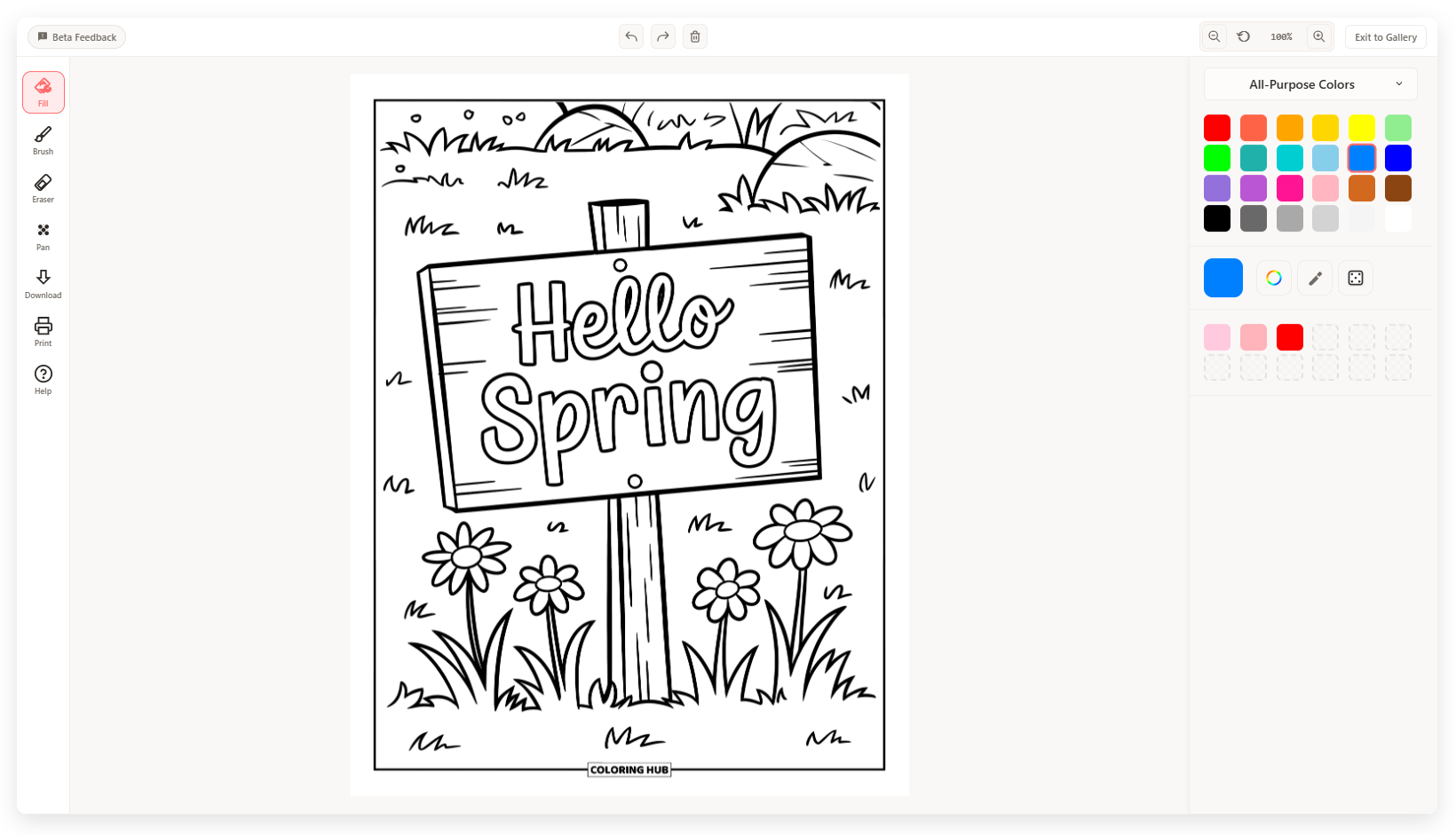
It’s also great if you’re the type of person who wants to color without downloading anything. You don’t need an app, you don’t need storage space, and you don’t need to update anything. You just open the page and start.
And because there’s no login or save system yet, it naturally works best for quick coloring breaks, one-page sessions, and those “I just want to relax for 15 minutes” moments. ColoringHub feels like a grab-and-go coloring resource, and honestly, sometimes that’s exactly what you want.
It’s very low effort in the best way!
7. The Color Options Are Better Than You’d Expect
ColoringHub gives you multiple ways to pick colors, including:
- preset palettes
- custom palettes
- hex codes
- an eyedropper
- a randomizer for quick ideas
That’s more flexibility than some paid apps offer, which is kind of wild.
If you’re picky about color, you’ll appreciate having more control. And even if you’re not super serious about coloring, it still makes the experience more fun. You can try new palettes, match colors more accurately, and experiment without needing advanced tools. For a free platform, it’s honestly a really nice bonus.
8. It Works on Any Device
Since ColoringHub is browser-based, it works on any device. You can use it on desktops, laptops, tablets, and phones.
The online coloring tool is best on desktop right now, but mobile users can still browse easily and download printable PDFs with no issues. So it’s still useful even if you can’t access the coloring tool on your phone.
This also makes it great for shared use. One person can download pages on a phone, another person can print them from a laptop, and someone else can color online on a desktop. It doesn’t lock you into one device, which makes it feel much more accessible.
Summary Table
| Feature | Chroma | ColoringHub |
|---|---|---|
| Platform | iOS only (iPhone, iPad) | Color online digitally, OR download printable PDFs for offline use |
| Access | Requires app download and installation | Instant browser access—no account, sign-up, or download needed |
| Cost | Paid upfront (no free trial or tier) | 100% free—no hidden fees, subscriptions, or paywalls |
| Creative Control | Advanced professional-grade tools with realistic textures, gradients, Apple Pencil support | Straightforward tools with brush customization, opacity control, and flexible color options |
| Coloring Options | Digital coloring only (stroke-by-stroke or tap-to-fill) | Adults seeking a premium digital coloring experience |
| Audience | Adults seeking premium digital coloring experience | Everyone—kids, adults, families, teachers, casual colorists |
| Tools | Professional tools: realistic pencils, markers, watercolors, brushes with texture simulation, time-lapse recording, buddy coloring | Essential tools: fill bucket, multiple brushes (brush, marker, splatter, highlighter, glitter), eraser, size/opacity controls, color palettes, eyedropper, randomizer |
| Ads | No ads (paid app) | Yes—site supported by unobtrusive ads |
| Artwork Style | Mix of hand-drawn and some AI artwork (thousands of pages) | AI-generated illustrations across all categories (tens of thousands of pages) |